All projects

Runs entirely on your Mac

Your inbox, sorted.
In one afternoon.

Years of ads, newsletters and notifications, gone in one sitting - however many there are. Emailyst shows you everything before it moves a thing, and your mail never leaves the Mac.

Apple silicon Mac on macOS 26 or newer. The free version sorts 500 messages per account.

Works with the accounts already in Apple Mail · iCloud · Gmail · Outlook · Fastmail · anything Mail can hold · signed and notarized by Apple

Open it, press one button,
go and do something else

There is nothing to set up. No sign-up, no password, no new inbox to learn.

It already knows your email

It uses the accounts you have in Apple Mail. You never type a password, because there is no account to make.

Press start, walk away

Thousands of messages while you make coffee. It tells you how long it has left.

Skim what it found

Grouped, so you judge two thousand at a time instead of one. Untick anything you want to keep and it takes the hint.

Seven thousand emails,
four decisions

The whole app is four screens. This is all of them.

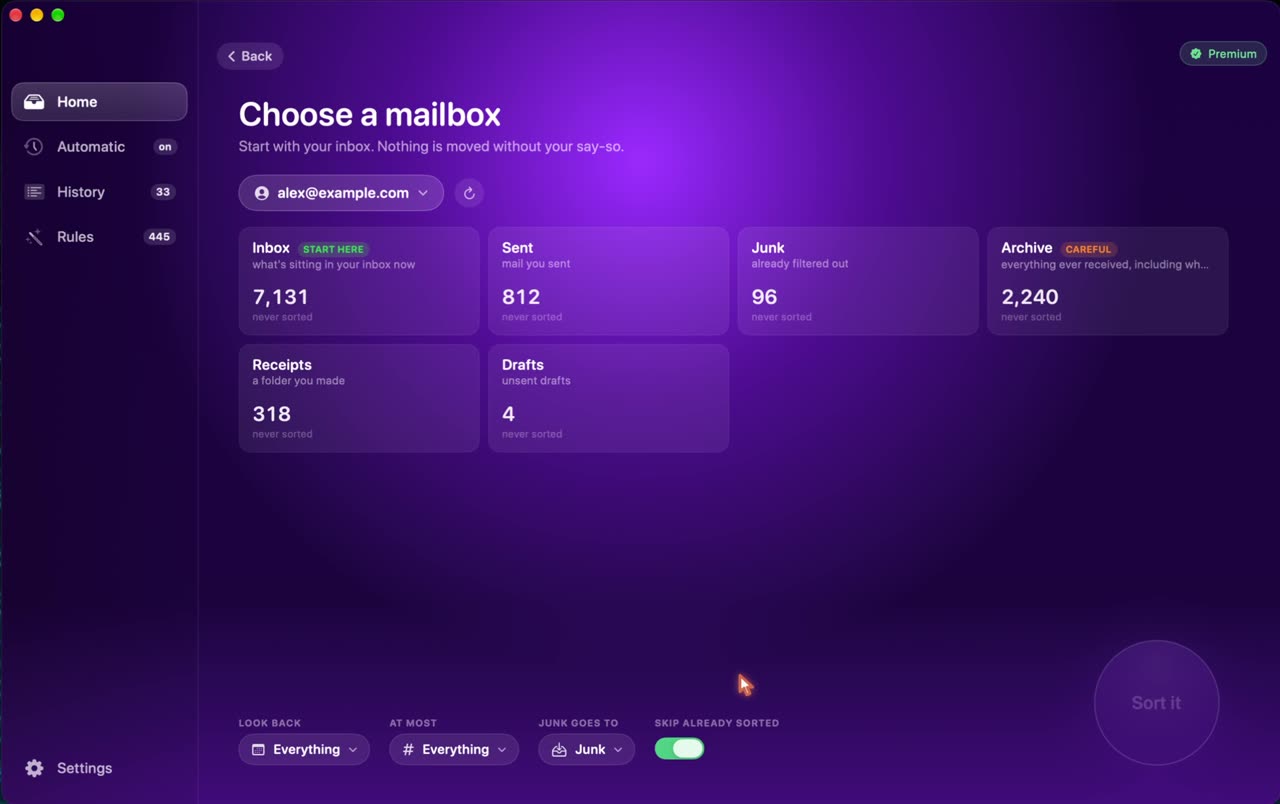
Start anywhere

Point it at whichever folder is worst

Usually the inbox. Sometimes it's an archive with eleven years in it. Emailyst counts what's in there first, so you know what you're about to take on.

  • Every account in Mail
  • Inbox, archive, junk, any folder
  • Go back a week or go back ten years
  • You pick where the junk lands
Emailyst listing the mailboxes in an account with a count of messages in each

On your Mac

Thousands of emails while you make coffee

It reads each message with the AI model Apple ships inside macOS. Nothing is uploaded, because there is nowhere to upload it to.

  • Uses the model built into macOS
  • Works with the Wi-Fi off
  • Tells you how long is left
  • Stop whenever - it keeps what it found
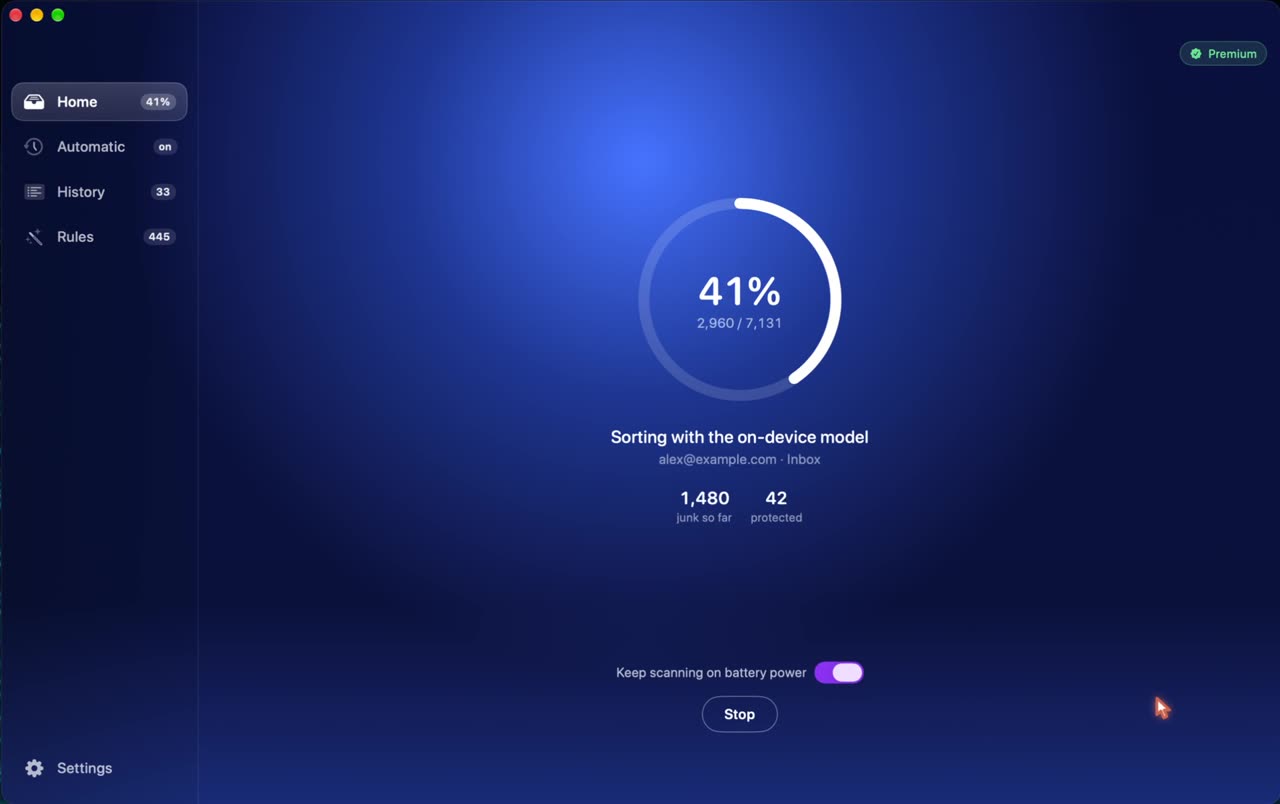
Emailyst part way through a scan, showing 41 percent and a count of junk found so far

One pass

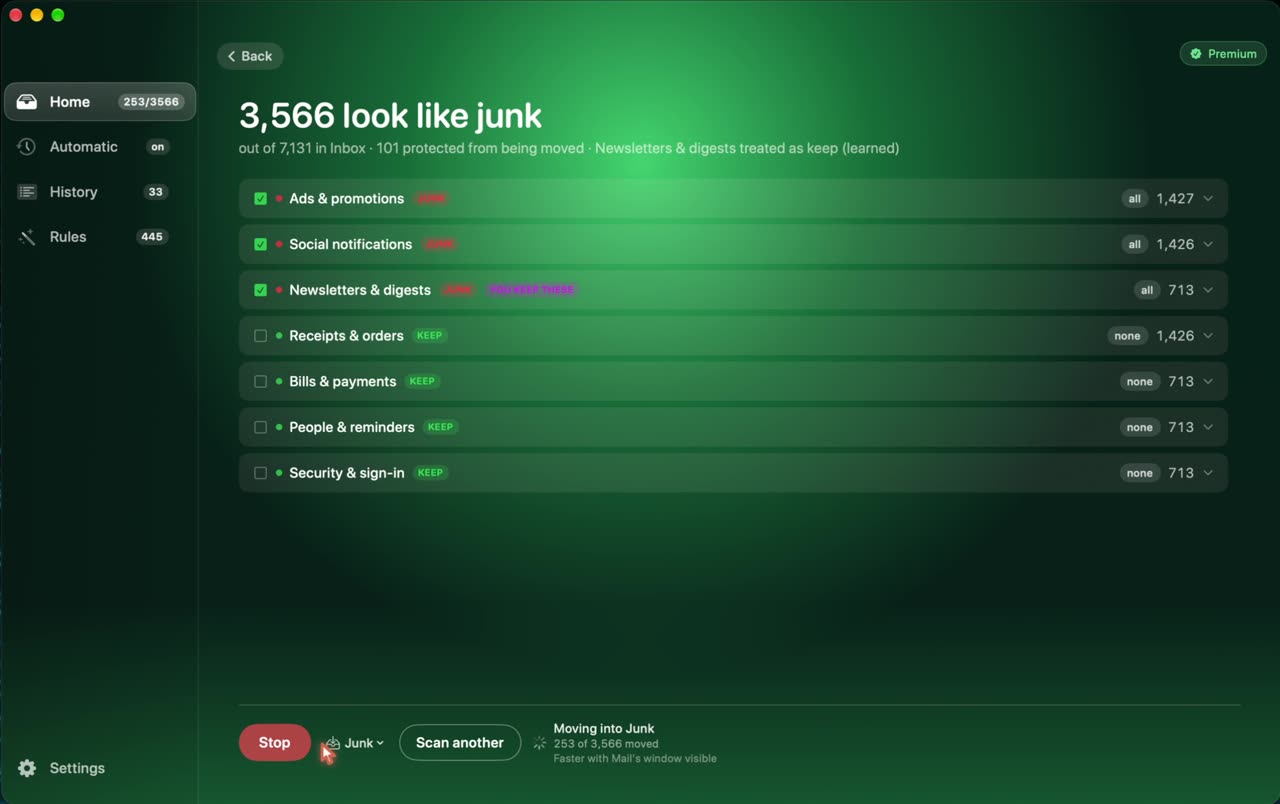
Judge two thousand at a time, not one at a time

Clearing an inbox isn't hard, it's seven thousand small decisions. Emailyst groups them so you make about six.

  • Grouped by what the mail actually is
  • Untick one and it applies the hint
  • Receipts and sign-in codes are protected
  • Learns the rule for next time
Emailyst showing 3,566 messages that look like junk, grouped into categories

Nothing is deleted

Change your mind at any point

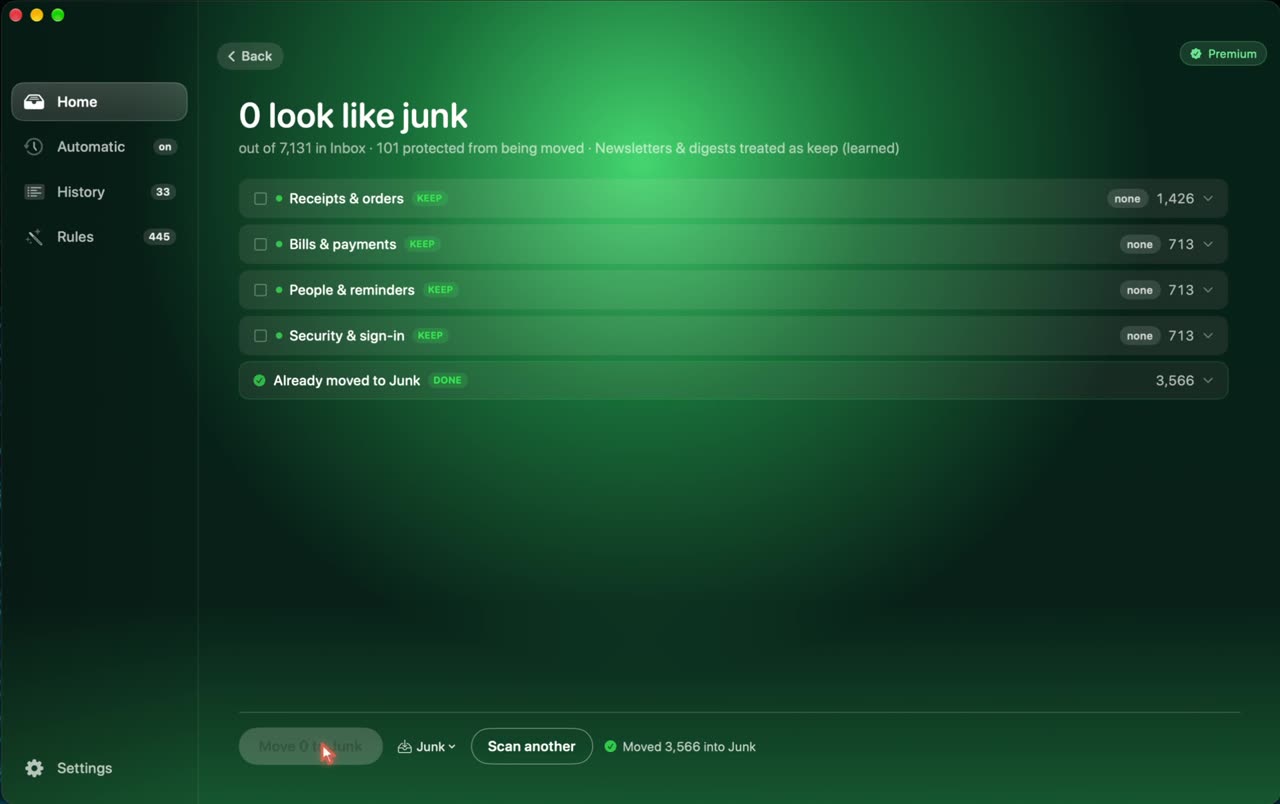
Nobody bulk-deletes email. It's too frightening - one wrong sweep and a receipt or a boarding pass is gone for good. So nothing is ever deleted.

  • Everything moves to a folder you chose
  • One button puts the whole lot back
  • Every sweep is kept in History
  • Put one message back and it learns
Emailyst after a sweep: nothing left that looks like junk, and a row showing what was moved

Why a tidy inbox is still
not a solved problem

Six things that are true about email, and what each one meant for how this was built.

The junk filter you already have gave up years ago

Mail, Gmail and Outlook catch the obvious scams and wave everything else through - the sales, the digests, the "we miss you" - because none of it is technically spam. Emailyst judges whether you want it, not whether it is fraud.

You have been meaning to clear your inbox for a year

Not because it's difficult. Because it's thousands of tiny decisions and you'd rather do anything else. Emailyst makes them in one sitting and shows you every one before it moves a thing.

You don't want to unsubscribe from everything

You want the ads gone and the replies kept. Untick one comment notification and Emailyst understands you meant all of those, not everything that sender has ever sent you.

Your email is the key to every account you own

Password resets, bank codes, everything. Every rival wants that password. Emailyst never asks for it, because it runs on your Mac and has nowhere to send anything.

Tagging junk is not the same as removing it

Most tools label your Gmail and leave it exactly where it was. Yours actually goes, and the number on the icon finally comes down.

Your inbox is full again within a month

Clearing it twice a year is worse than never starting. Set a schedule and it keeps up from the menu bar while you forget about it.

The others want
your password

Every rival is a website you log into your email with, and pay monthly, forever. Emailyst is a program on your Mac that you buy once.

Cloud inbox cleanersEmailyst
Where your mail is readOn their serversOn your Mac
What they need from youFull mailbox access, foreverNothing - it uses Mail
If the company foldsService stopsStill works. It's a program you own
How it decidesRules you write, or sender listsReads what the message is
Cost$60-120 every year$29 once
Deleting thingsOften the whole pointNever deletes anything

Private because of how
it is built

Not a promise in a policy. There is no server that can read your mail, so there is nothing to promise.

Your mail stays on the Mac

Every message is read by the model inside macOS. Nothing is sent anywhere - turn the Wi-Fi off and it still works.

No password, no account

It reads the accounts already set up in Apple Mail. There is nothing to sign into and nothing to revoke later.

One small daily check-in

A scrambled machine id, free or paid, the versions, and two totals - so I know how many copies are out there. Never a message, address or account name, and you can switch it off.

One price, once

Not a subscription. Version 1 is yours to keep and never stops working.

Free

$0
  • 500 messages per mail account
  • Full sorting, grouping and rules
  • Nothing uploaded, nothing deleted
  • Sorting on a schedule
  • Unlimited mailboxes
Download

Apple silicon · macOS 26+

Launch price

Full version

$49$29 once
  • Your whole inbox - no limit
  • Automatic sorting on a schedule
  • Three Macs on one licence
  • Every version 1 update, free, forever
  • Card, Apple Pay, Google Pay or PayPal
Buy a licence - $29

Card or PayPal, no account needed. Your licence key is on the screen the moment you pay, and in your email. Three Macs on one key. By buying you agree to the terms of sale; 14-day refund if it is not for you.

Pay once, keep it for good. Your licence covers every update to version 1 - every fix and every new feature that lands in 1.x - at no extra cost. If a version 2 ever comes, it will be a separate release, and everyone who bought version 1 gets it at a heavily discounted upgrade price. Your copy of version 1 never stops working.

Before you
buy

Anything else, write to [email protected]. It's one person, and I answer.

What Mac do I need?

An Apple silicon Mac - M1 or later - on macOS 26 or newer. The AI model Emailyst uses lives in macOS itself and does not exist on Intel Macs or older systems, so there is no version that can run there.

Does it work with Gmail and Outlook?

Yes, and anything else Apple Mail can hold. Emailyst sorts the accounts already set up in Mail, so whatever works there works here.

Gmail needs one extra step: to move mail rather than only label it, Google wants an app password. Emailyst explains this at the moment it matters, and works without it.

Does my mail get uploaded anywhere?

No. Every message is read on the Mac by the model inside macOS. Turn the Wi-Fi off and the app still sorts.

Once a day the app sends odibert.com one small record so I know how many copies are out there: a scrambled machine id, free or paid, the app and macOS versions, and two totals - scans run and messages filed. Never a message, an address or an account name. You can switch it off in Settings.

Why does it want Full Disk Access?

Because Mail's database is where your mail is, and macOS keeps that behind Full Disk Access. It asks on the first run and shows you exactly which switch to flick.

Can it delete something by mistake?

It cannot delete anything at all. Everything moves to a folder you chose, every sweep is kept in History, and one button puts the whole lot back where it came from.

What does the free version leave out?

Nothing about how it sorts. The free version reads, groups, learns rules and puts things back exactly like the paid one, on 500 messages per mail account.

Paying lifts the limit and switches on the Automatic tab, which sorts new mail on a schedule from the menu bar so the inbox stays clear without you opening the app.

Is it really one payment?

Yes. $29 today, three Macs on the key, and every 1.x update free forever. No subscription and no renewal. If a version 2 ever arrives it will be a separate release at a heavily discounted upgrade price, and your copy of version 1 keeps working regardless.